
Best Desktop Motherboards 2026: Top ASUS, GIGABYTE & MSI Picks
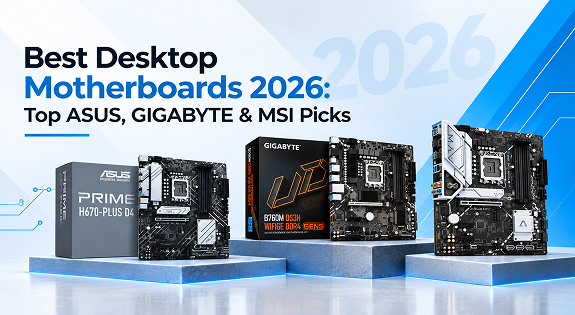
Building or upgrading a PC always starts with one decision that shapes everything else: the motherboard. It is the one component that determines which processor you can use, how much memory you can install, how many drives you can connect, and how much room you have to upgrade later. Yet it is also one of the most overlooked parts of a build, with most buyers spending far more time picking a graphics card or CPU than the board that actually holds the entire system together.
If you are putting together a new rig in 2026, this guide breaks down everything you need to know about choosing the right desktop motherboard, along with a look at where ASUS desktop motherboard, GIGABYTE desktop motherboard, and MSI desktop motherboard lineups stand out.
Why the Motherboard Deserves More Attention
A computer motherboard is often described as the backbone of a PC, and that is not an exaggeration. Every other component processor, RAM, storage, graphics card, cooling connects to it in some way. A weak or mismatched board can bottleneck an otherwise powerful build, cause instability under load, or simply run out of upgrade paths within a year or two.
On the other hand, picking the best desktop motherboard for your specific needs means smoother performance today and an easier upgrade path down the line. Whether you’re assembling a home office machine, a content creation workstation, or a full gaming rig, the board you choose sets the ceiling for what your PC can eventually become.
What to Look for in a Desktop Motherboard
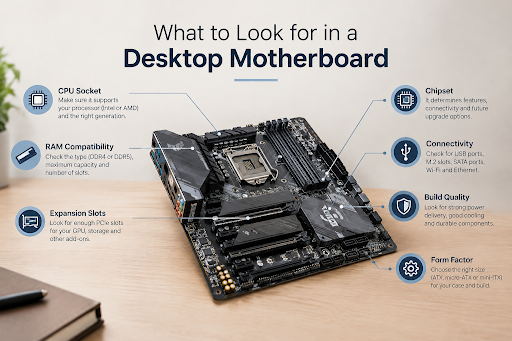
Before jumping into specific brands, it helps to understand the core specs that actually matter when shopping for a motherboard for PC:
- Chipset and socket compatibility – This determines which generation of Intel or AMD processors the board supports (common options include B760, B860, Z790, Z890, X870, and B550/B650 on the AMD side).
- Form factor – ATX, Micro-ATX (M-ATX), Mini-ITX (M-ITX), and E-ATX boards suit different cabinet sizes and expansion needs.
- Memory support – DDR4 vs DDR5 support, maximum RAM capacity, and number of slots affect both performance and future upgrades.
- Connectivity – PCIe slots for graphics cards, M.2 slots for NVMe SSDs, USB ports, and onboard Wi-Fi are all worth comparing.
- Power delivery (VRM) – A stronger VRM design keeps voltage stable under sustained load, which matters a lot for gaming and heavy multitasking.
- Build quality and warranty – Reinforced PCIe slots, better capacitors, and a solid manufacturer warranty add long-term value.
Balancing these factors against your budget is really the whole game when it comes to finding the right board.
Top ASUS Desktop Motherboards
ASUS has built a long-standing reputation for reliability, and its 2026 lineup reflects that across every price tier. The ASUS desktop motherboard range spans budget-friendly Prime series boards all the way up to premium ProArt and ROG-adjacent options for creators and enthusiasts.
- ASUS Prime B760M-A / B760M-K (DDR5) – Well-balanced boards for mainstream Intel builds, offering solid VRM performance and good expansion at a reasonable price point.
- ASUS Prime B860M-A – A newer-generation option built around the latest Intel chipset, suited for users planning a longer-term upgrade path.
- ASUS Prime Z790-P CSM (with WiFi variant) – A step up for users who want more overclocking headroom and additional connectivity, including onboard wireless.
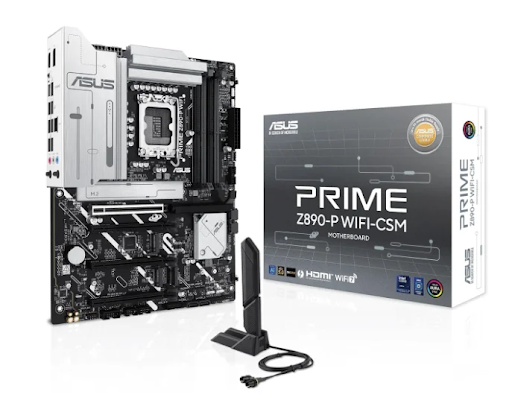
- ASUS Prime Z890-P WiFi CSM DDR5 – A future-ready pick supporting the newest Intel platform with DDR5 memory.
- ASUS ProArt Z890-Creator WiFi – Aimed at content creators, with extra USB-C bandwidth, robust power delivery, and a design tuned for multitasking-heavy workloads rather than pure gaming.
- ASUS Prime X870-P-CSM – A strong AMD-platform choice for users building around Ryzen processors with DDR5 support.
ASUS boards are generally a safe, well-rounded choice whether you’re assembling a budget office PC or a high-end workstation.
Best GIGABYTE Motherboard Options
GIGABYTE has carved out a strong position with boards that emphasize durability and value for money. A GIGABYTE motherboard typically brings reinforced steel PCIe slots, dependable power circuitry, and thoughtful I/O layouts, making it a favorite among budget-conscious builders who still want dependable performance.
The GIGABYTE B760M DS3H WF6E (DDR4, Gen5-ready) is a good example of this approach it keeps costs down for users still on DDR4 while offering onboard Wi-Fi and modern connectivity options. For anyone who wants a no-nonsense board that just works without unnecessary extras, GIGABYTE’s mid-range lineup is worth serious consideration.
MSI Desktop Motherboard Highlights
MSI rounds out the “big three” motherboard brands, known for aggressive VRM designs and boards that lean toward performance-focused builders. An MSI desktop motherboard is often chosen by users who want strong overclocking support without stepping into flagship pricing, along with clean BIOS software and dependable driver support.
MSI’s mid-range and gaming-focused boards typically compete directly with ASUS and GIGABYTE at similar price points, so it’s worth comparing specific models side by side rather than picking a brand purely on reputation.
Best Motherboard for Gaming PC Builds
If your main goal is gaming, the priorities shift slightly. A motherboard for gaming PC builds should offer:
- A PCIe 4.0 or 5.0 slot for your graphics card
- At least one fast M.2 NVMe slot for game loading speeds
- Strong VRM cooling to support higher-wattage CPUs under sustained gaming loads
- DDR5 support if you’re pairing it with a current-generation processor
Boards like the ASUS Prime B860M-A, ASUS Prime Z790-P CSM WiFi, and GIGABYTE B760M DS3H WF6E all fit well into this category, offering a good mix of gaming performance and pricing. For enthusiasts chasing the best gaming motherboard experience, stepping up to Z890 or X870 chipset boards unlocks more overclocking flexibility and future CPU compatibility.
If budget is tighter, don’t assume you need to spend on flagship boards a well-chosen mid-range chipset combined with a good CPU and GPU will outperform an expensive motherboard paired with weaker core components. The best motherboard for gaming PC setups is really the one that matches your CPU and GPU tier without unnecessary overspend.
Choosing the Best Motherboard for PC (Non-Gaming Use)
Not every build is about gaming. For office work, content creation, or general productivity, the best motherboard for PC usage often prioritizes stability, sufficient RAM capacity, and enough USB/storage ports over raw overclocking power. Boards like the ASUS Prime H610M-CS or Prime H670-PLUS D4 are well suited to this kind of everyday, reliability-first computing.
Where to Buy Desktop Motherboard Online in India
Once you know which chipset, socket, and form factor you need, the next step is finding a trustworthy place to purchase. When you buy desktop motherboard online, it’s worth checking for genuine products, manufacturer warranty coverage, and a seller who can guide you if you’re unsure about compatibility with your existing CPU, cabinet, or memory kit.
For anyone searching for a reliable motherboard for PC India wide, working with an established hardware retailer makes the process far less stressful — especially when you need pan-India delivery, authentic ASUS, GIGABYTE, and MSI stock, and support from people who actually understand PC builds.
Final Thoughts
There is no single “best” motherboard for everyone the right choice depends on your processor platform, budget, and how you plan to use the PC. ASUS, GIGABYTE, and MSI each bring genuine strengths to the table, whether that’s ASUS’s broad and reliable lineup, GIGABYTE’s value-focused durability, or MSI’s performance-oriented boards for enthusiasts.
If you’re ready to buy, Uniq Infotech offers a wide range of genuine ASUS, GIGABYTE, and MSI desktop motherboards across chipsets, sockets, and budgets, with pan-India shipping and support to help you pick the right board for your build.