
How to Choose the Right Laptop Battery Replacement for Your Laptop
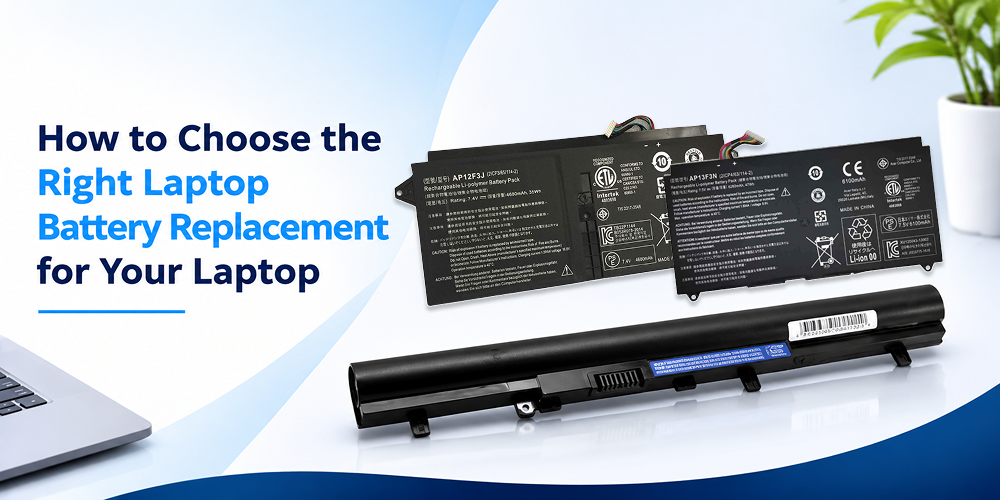
A laptop battery plays an important role in keeping your device portable and convenient. Whether you use your laptop for office work, online classes, gaming, or everyday tasks, a reliable battery helps you work without constantly searching for a power outlet. However, laptop batteries gradually lose their ability to hold a charge. When your laptop starts shutting down unexpectedly, charging slowly, or running out of power quickly, it may be time to consider a replacement.
Choosing the right Laptop Battery Replacement requires more than selecting a battery that looks similar to your existing one. You need to check compatibility, battery specifications, capacity, voltage, and quality before making a purchase.
This guide explains how to identify the correct battery, understand important specifications, and choose a suitable replacement for your laptop.
Why Does Your Laptop Battery Need Replacement?
Laptop batteries experience gradual wear because of repeated charging and discharging. Over time, their capacity decreases, and they may no longer provide the same backup they offered when the laptop was new.
Several signs indicate that your battery may need replacement.
1. Reduced battery backup
If your laptop once lasted several hours but now runs for only a short period without charging, the battery may have lost significant capacity.
2. Unexpected shutdowns
A laptop that switches off suddenly, even when the battery percentage appears sufficient, may have a worn or unreliable battery.
3. Charging problems
If the battery struggles to charge fully or the percentage changes unusually, it may indicate battery degradation or another charging-related issue.
4. Battery health warnings
Some laptops display battery health notifications when the system detects reduced capacity or a potential battery problem.
5. Physical swelling
A swollen battery is a serious warning sign. Stop using and charging the laptop, avoid pressing or puncturing the battery, and arrange professional service or safe replacement.
Before purchasing a new battery, confirm that the problem is actually related to the battery. Charging adapters, charging ports, and software issues can also affect battery performance.
1. Check Your Laptop Model Before Buying a Battery
The first step in choosing a Replacement Laptop Battery is identifying your exact laptop model.
Laptop manufacturers produce multiple models with similar names, and their batteries may have different dimensions, connectors, capacities, and electrical specifications.
For example, two laptops from the same manufacturer may use different batteries even if they belong to the same product series.
You can usually find your laptop model through:
- The product label on the laptop’s bottom panel
- System information in your operating system
- The original purchase documentation
- The manufacturer’s official support website
- The existing battery label, if the battery can be safely accessed
Write down the complete model number rather than relying only on the brand name.
When searching for Laptop Spare Parts Online, using the exact laptop model helps narrow down compatible products and reduces the risk of ordering an incorrect battery.
2. Understand Laptop Battery Model Numbers
Every laptop battery has identification information printed on its label.
This information helps determine whether a replacement battery is suitable for your device.
Important details include:
- Battery model or part number
- Voltage rating
- Capacity in mAh or Wh
- Battery connector information
- Manufacturer or product identification details
The battery part number is particularly useful because it can help identify compatible replacement options.
However, do not assume that batteries with similar model numbers are interchangeable. Always compare the specifications and confirm compatibility with your laptop.
If the original battery is difficult to access, check the manufacturer’s documentation or ask a qualified technician to identify the correct replacement.
3. Check Battery Voltage and Specifications
Voltage is one of the most important specifications when selecting a laptop battery.
The replacement battery should match the voltage requirements specified for your laptop. Using an incompatible battery can cause charging problems or prevent the laptop from operating correctly.
Check the voltage printed on your original battery and compare it with the replacement product specifications.
Battery capacity is another important factor.
Capacity is generally expressed in milliamp-hours (mAh) or watt-hours (Wh). It indicates how much energy the battery can store.
When comparing batteries, watt-hours provide a useful way to understand their energy capacity.
A battery with a higher capacity may provide longer backup time, but actual performance also depends on the laptop’s power consumption, battery condition, and workload.
Always prioritize compatibility over selecting the battery with the largest advertised capacity.
4. Choose the Right Laptop Battery Capacity
Laptop Battery Capacity directly influences how much energy your battery can store.
A higher-capacity battery may offer longer usage between charges when it is compatible with your laptop.
However, battery capacity alone does not determine how long your laptop will run.
For example, a laptop used for browsing, documents, and online meetings may consume less power than a laptop running demanding applications or games.
Before choosing a battery, consider:
- Your laptop’s supported battery capacity
- The original battery’s watt-hour rating
- Your daily usage requirements
- Whether the replacement battery matches the laptop’s design
- The expected balance between battery backup and portability
For everyday users, a compatible battery with appropriate capacity is generally a better choice than an unsupported high-capacity option.
5. Original vs Compatible Laptop Battery
When shopping for a replacement, you may find original and compatible battery options.
Both require careful evaluation.
Original Laptop Battery
An original battery is designed for the laptop manufacturer’s specified model or replacement part.
It can be a suitable option when you want a battery that follows the manufacturer’s specifications.
However, verify the product’s authenticity, condition, warranty, and compatibility before purchasing.
Compatible Laptop Battery
A Compatible Laptop Battery is manufactured to work with specified laptop models.
Compatible batteries can provide a practical replacement when the original battery is unavailable or when you are comparing different suitable options.
Before choosing one, check:
- Supported laptop models
- Battery part number compatibility
- Voltage and capacity
- Connector and physical dimensions
- Product warranty and seller support
A compatible battery should meet the laptop’s requirements rather than simply fitting inside the battery compartment.
6. Consider Laptop Battery Performance and Quality
Laptop Battery Performance depends on several factors, including battery capacity, manufacturing quality, laptop power consumption, and charging habits.
A suitable battery should provide reliable operation and consistent charging when used with a compatible laptop.
When comparing replacement batteries, consider the following points.
Product specifications: Check the voltage, capacity, battery model, and supported laptop models.
Build quality: Look for clear product information and a battery designed for the intended laptop.
Warranty: Review the available warranty and replacement conditions before purchasing.
Seller reliability: Choose a seller that provides accurate specifications and assistance with compatibility questions.
Battery condition: Avoid products with unclear manufacturing details, damaged packaging, or questionable authenticity.
A lower price does not always represent better value. A battery that fails prematurely can lead to additional replacement costs and inconvenience.
7. How to Choose the Right Battery for Your Laptop Brand
Different laptop manufacturers use different battery designs and specifications.
Although the selection process is similar, you should always verify the exact model and part number.
HP Laptop Battery
For HP laptops, check the complete laptop model and battery part number. Some HP models use batteries that look similar but have different connectors or capacities.
Dell Laptop Battery
Dell batteries should be checked against the laptop’s model and supported battery specifications. Confirm the battery identification number before ordering.
Lenovo Laptop Battery
Lenovo laptops may use different battery designs depending on the series and generation. Check the model information and battery part number carefully.
Acer Laptop Battery
Acer batteries can vary across Aspire, Swift, Nitro, and other product series. Confirm compatibility with the exact laptop model rather than relying only on the series name.
ASUS Laptop Battery
ASUS laptops also use model-specific battery configurations. Compare the battery identification details with the replacement product specifications.
When searching for Genuine Laptop Parts, focus on accurate product identification, clear specifications, and reliable seller support.
8. Where to Find the Right Laptop Battery Replacement
Finding the correct battery becomes easier when you shop through a dedicated laptop parts category.
A reliable product listing should provide useful information about compatibility, specifications, and available warranty support.
If you are planning to Buy Laptop Parts Online, check the product details before adding a battery to your cart.
Look for:
- Exact battery model or part number
- Supported laptop models
- Voltage and capacity information
- Product images and specifications
- Warranty information
- Delivery and return conditions
You can explore the Laptop Parts Online category at Uniq Infotech to find laptop batteries and other replacement components.
The category also includes adapters, CPU fans, DC jacks, display cables, hinges, laptop keyboards, and motherboards.
This makes it convenient to explore different Laptop Spare Parts Online when your laptop requires additional repairs.
9. Tips to Improve Your New Laptop Battery’s Life
After installing a suitable replacement battery, a few practical habits can help maintain its performance.
Avoid excessive heat: High temperatures can accelerate battery wear. Keep your laptop’s ventilation areas clear and avoid using it on surfaces that block airflow.
Use the correct charger: Follow the manufacturer’s charging requirements and use a compatible power adapter.
Avoid unnecessary deep discharges: Regularly allowing the battery to reach extremely low levels may contribute to additional wear.
Keep your laptop updated: Operating system and manufacturer updates may improve power management and resolve certain battery-related issues.
Check battery health periodically: Use your laptop’s built-in battery information or manufacturer utilities to monitor its condition.
Follow manufacturer recommendations: Battery charging features and storage guidance can differ between laptop models.
These practices cannot prevent natural battery aging, but they can help support consistent performance over time.
10. Common Mistakes to Avoid When Buying a Laptop Battery
Choosing a battery without checking compatibility can lead to unnecessary expenses.
Avoid these common mistakes:
- Buying a battery based only on the laptop brand
- Ignoring the battery part number
- Selecting an incompatible voltage
- Choosing capacity without checking laptop specifications
- Assuming every battery from the same series will fit
- Purchasing products with unclear specifications
- Ignoring warranty and return conditions
If you are unsure about the correct battery, confirm the specifications with the manufacturer or a qualified technician before placing your order.
Conclusion
Choosing the right Laptop Battery Replacement starts with understanding your laptop’s exact model, battery part number, voltage, and capacity requirements.
A suitable Replacement Laptop Battery should match your laptop’s specifications, provide dependable performance, and come with clear product information and warranty support.
Before purchasing, compare compatibility, capacity, quality, and seller reliability rather than focusing only on price.
If you need a battery or other replacement components, explore Best Laptop Parts options by checking the product specifications carefully.
Uniq Infotech offers a range of laptop components through its Laptop Parts Online category, helping users explore batteries and other replacement parts for their laptop repair and maintenance needs.